How Animation Cancels Work in League of Legends
A primer on how to use animations work and how to use animation cancels to your advantage.
A primer on how to use animations work and how to use animation cancels to your advantage.
When you do almost any action in League of Legends, your character will do a motion that matches what you have input. You might be walking to a far-off corner of your lane, throwing out a long-range ability to catch the jungler off guard, trying to hit that last autoattack on the low-health enemy, or even just farming… but your character is always doing something. These actions are what we call animations.
During many animations, you are usually not able to do much else. You have to let it play out. If you have already pressed your attack button once, pressing it again while the attack is heading toward the enemy will not do anything for you. While it won’t make your attack hit faster, it will also not stop you from attacking again afterward. It’s the same for spells, but cooldowns usually prevent using them twice. Even if their cooldown is very low, though, animations will usually keep you locked out of double casting it. While you are in the middle of an action, you will not be able to do it again.
Some animations have windups, which are animations that have to play before the damage is actually dealt, or effects are properly applied. An easy example of a heavy windup would be Senna’s autoattacks. Before her gun shoots the enemy, she does this “line up” animation that leads into the damage going through.
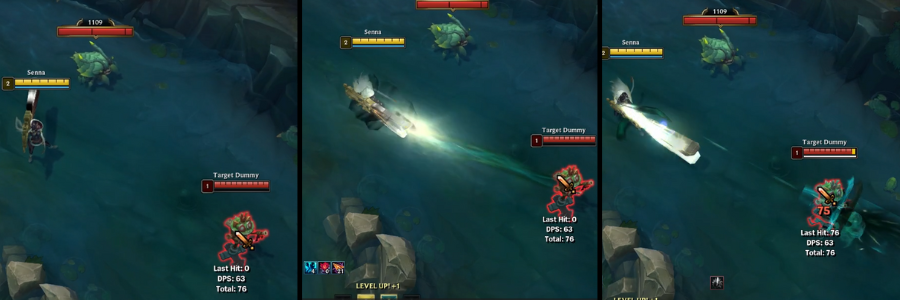
If you input another action during a windup, it will stop your damage from hitting, and you will only do the second action you input. Losing that extra amount of damage you expected might feel like a mistake. In this case, it might be. The reality, though, is that there are a handful of Champions that abuse overriding characters’ motions. That missed input is a simple, yet often accidentally done, version of animation canceling.
If you meant to hit the enemy with an auto, cancelling it might seem like a bad idea. That doesn’t mean that animation canceling has no use, though! In a broad sense, cancelling an autoattack might give you just enough time to get out of the way of Blitzcrank’s Rocket Grab. If you accidentally sent your autoattack to the wrong target (like a full-health caster minion instead of the dangerously low cannon minion), cancelling the auto could give you some extra gold.
Surprisingly, some Champions rely heavily on cancels to either output the most damage, or to function in general in extreme cases. With these characters, animation canceling is more of a damage boost than a tool for safety. Hitting your cancels correctly might be what makes a difference in a 1v1, even if you and then the enemy laner were both playing the same Champion, both had the same items, and both tried the same gameplan.
Since windups are animations in the time before your damage comes out, winddowns are what is left after your damage has hit the enemy. Champions don’t stop their swing as soon as they hit the enemy, they swing all the way through. This part of the animation does not realistically help you much in combat, but this is where animation cancelling comes into play.
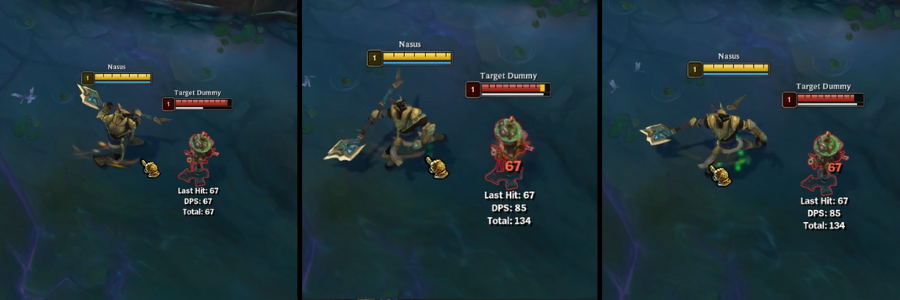
Here, we see that Nasus will raise his staff, swing it across the enemy (which puts through the damage), and then continue swinging it back.
There are quite a few Champions in the game that flourish when they can cancel their abilities, but the most famous examples are Riven and Katarina, by far. Riven’s entire kit focuses on chaining ability cancels into each other to do more damage in less time. Katarina does something similar, by canceling parts of her animations with Shunpo to reset her daggers. If you have ever ran into someone on the other team that seemed to flow their abilities together smoother than yours, they were probably using cancels to maximize their damage output.
Canceling abilities largely focuses on getting rid of the wind down part of your ability. When your damage or status effect has hit the enemy, you don’t have to keep sitting and waiting for your character to return back to their idle pose before casting again. You can use autoattacks, another ability, or movement inputs (clicking to move) to cancel. Every Champion has their own timing with cancels, so going into practice tool and labbing can really help you get used to the timing.
Almost every Champion in the game can gain damage or movement by canceling their autoattack winddowns, but some Champions do need to do it more often than others. A common group of these Champions are Attack Damage Carries (ADCs). Caitlyn and Vayne can keep their damage high without sacrificing mobility. Kiting, or keeping your distance from enemies, is much easier when you use movement inputs to stop the winddown from slowing your escape.
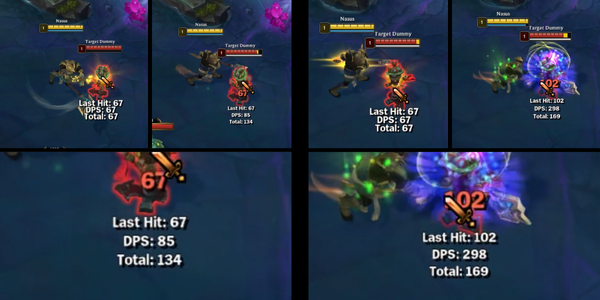
Some toplaners also enjoy cancelling their autos! Nasus has a painfully slow windup and winddown, but his Siphoning Strike is a free autoattack reset and empowered autoattack all in one. Kayle needs to cancel her autos with movement to keep away from the enemy, but her Starfire Spellblade acts like Nasus’ Siphon Strike.
The damage output is much higher in the same (or less) amount of time if we take advantage of canceling the autoattack winddown and use Siphon Strike instead:
The easiest way to cancel your autoattacks is to do the attack normally, and then immediately after click a place on the map to move to. Repeat that with every autoattack, and you’ll be keeping the enemy off of you in no time. Especially for ADCs, that have small health pools and (usually) limited mobility, keeping people out of melee range might be your only way of staying safe. Learning how to kite people
If you’re playing Nasus, Kayle, or another Champion that has an empowered autoattack ability, you will want to autoattack regularly, then cast your empowered auto ability as the winddown animation is playing. Repeating that on cooldown will put in the most work and allow you to deal the most damage.
Knowing how animations affect what you can and can’t do at any given point of the game might seem like something you wouldn’t need to know to be good at the game, but it might be the difference between a game-winning ace or a game-throwing death. Paying attention to how you are moving, when you are moving, and what that means for the enemy is a good way to have a better idea of what they might think of doing. With time and practice, this will come naturally, but as you start out, keeping a closer eye on it will get you more used to it!